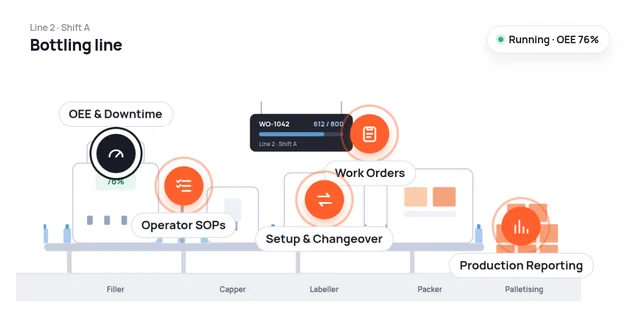
DelphEon connects work orders, operators and machines in one live view, so teams can track production progress, catch losses as they happen and deliver the planned output.
Planner creates work order WO-1042Work order goes to the shop floorOperator receives it on the tabletOperator starts the job at the machineUnits come off the lineUnits are packed and stackedBoxes loaded into the truck✓ Dispatched: order complete
The challenge
Disconnected production data, harder execution.
Machine status?Actual output?Order progress?
Limited Production Visibility
Production progress, machine status, and actual output are not always available in one place.
Stopped 42 minReason: not recorded
06:0010:0014:00
Unplanned Downtime & Performance Losses
Machine stoppages, speed losses, and recurring disruptions affect output without always having clearly recorded causes.
Work ordersShift logOutput.xlsxManual updates
Disconnected Execution Records
Work orders, operator activities, production confirmations, and shift reports often require manual updates and consolidation.
How DelphEon helps
Connect production performance with shop-floor execution.
DelphEon brings together machine information, production activities, and operational workflows to provide a connected view of manufacturing execution.
Line supervisorShift supervisorMachine operatorPlant manager
Line 2 · live● LiveSupervisor
OEE · this shift
76%OEE
MachinesLine 2
DepalletizerRunning
Filler 2Stopped · 8 min
CapperRunning
LabelerIdle · 3 min
Output today612 / 800 units
Filler 2 stopped at 10:34Select a reason
ChangeoverMaterial waitBreakdownMinor stop
Work orders · Shift A● LiveSupervisor
WO-1042Filler 2 · Operator AK
612 / 800Running
WO-1043Line 3 · Operator SR
140 / 600Behind plan
WO-1044Line 3 · Operator SR
0 / 500Ready to start
Next up · Line 3WO-1044 · 2 L bottles · 500 unitsSetup checklist assigned to SR
Start work order
WO-1043 is 18% behind plan at this point in the shift.
Filler 2 · start-up● LiveOperator
SOP-PK-07 · Filler start-upStep 4 of 6
Load approved recipe for WO-104206:34
Clean and sanitise filler nozzles06:38
Verify fill volume on the first 5 bottlesMeasured500 mlConfirm
Record first-off check
Record
Attach photoNote a deviation
Step 3 confirmedAK · 06:38
Done
Guard sensor slowAK · 06:31
Review
WO-1042 · Filler 2Operator sign-offEvery step and reading is saved to the work order with time and operator
Sign & submit
Line 2 · weekly review● LiveManager
OEE · this week74 %+2 pts
Downtime4h 39m−38 min
Output11,920 units96% of plan
Planned vs actual
Plan 800
At or above
Below
Top losses this week
Changeover2h 05m
Material wait1h 12m
Minor stops50m
Breakdown32m
Changeovers average 34 min, 4 min over target. The longest was WO-1042 → WO-1043.
Key capabilities
From production visibility to connected execution.
Select a point on the line to see that capability.
At the filler · machine data
OEE & Downtime Monitoring
Understand equipment performance and identify where production time is being lost.
Track availability, performance and quality losses, running and idle time, stoppages and downtime reasons across machines, lines and shifts. Compare periods to find recurring losses and where effectiveness can improve.
OEE & downtime · Line 2Illustrative
OEE · this shift
76%OEE
Where OEE is lost
Availability84%
Performance93%
Quality97%
76% = 84% × 93% × 97%
Downtime by reason · this weekBy shift
Changeover2h 05m
Material wait1h 12m
Minor stops50m
Breakdown32m
Changeover is the biggest loss on Line 2 this week.
On the line board · today’s orders
Work Orders & Production Execution
Connect production requirements with actual shop-floor activities.
Manage work orders, follow their execution status and progress against planned quantities and targets, and link each job to the equipment, operators and shift behind it.
Work orders · todayIllustrative
Work orders 4 today
WO-10411 L bottles · Line 1 · Shift A
800 / 800Completed
WO-1042500 ml bottles · Line 2 · Shift A
612 / 800Running
WO-1043250 ml cans · Line 3 · Shift A
140 / 600Behind plan
WO-10442 L bottles · Line 3 · Shift B
0 / 500Waiting for setup
WO-1043 is 18% behind plan at this point in the shift.
At the operator tablet
Operator Activities & Digital SOPs
Bring consistency and accountability to everyday production activities.
Give operators the right work instructions and digital SOPs while capturing confirmations and execution records. Standard workflows replace paper and keep supervisors informed.
Operator view · Filler 2Illustrative
SOP-PK-07 · Filler start-upStep 4 of 6
Check guards and interlocks06:31
Load approved recipe for WO-104206:34
Clean and sanitise filler nozzles06:38
Verify fill volume on the first 5 bottlesMeasured500 mlConfirm
Record first-off check
Release line to production
Activity log
Step 3 confirmedNozzles cleaned · 06:38
Done
Recipe loadedWO-1042 · 06:34
Done
Deviation notedGuard sensor slow · 06:31
Review
At the labeller · product change
Setup & Changeover Tracking
Understand how setup and changeover activities affect production availability.
Track setup, preparation and changeover durations across production runs. Analyze delays and their recurring causes to make transitions between jobs or products more efficient.
Waiting for the first-off check is the most common cause of overruns.
End of line · finished output
Production Confirmation & Reporting
Maintain a connected record of what was produced and how production progressed.
Capture quantities and completed operations, compare planned with actual output by shift, and combine machine data with production records for easier handovers and less manual reporting.
Shift report · Line 2 · todayIllustrative
Actual vs plannedBy shift
Shift A812 / 800
Shift B746 / 800
Shift C654 / 700
Units confirmed against the work-order plan
Shift A · confirmed
Filling · Op 10812 units confirmed
Done
Labeling · Op 20806 units confirmed
Done
Scrap · 6 unitsLabel misprint
Logged
Shift report ready for handover: 2,212 of 2,300 planned units, 96%.
Beyond monitoring
See what's happening now. Know what to improve next.
Machine Performance
Understand operating status, utilization, downtime, and production losses.
Production Progress
Follow work-order status, planned quantities, actual output, and execution progress.
Operational Activities
Maintain visibility into operator updates, work instructions, production records, and relevant workflow activities.
Performance Review
Use connected production information to investigate deviations, understand recurring issues, and support improvement initiatives.
Business benefits
Make every production decision more informed.
When machine data, work orders and shop-floor records are connected, everyday production runs with fewer surprises and less chasing.
Greater Production Visibility
Understand machine performance, production progress, and operational activities across the shop floor.
Better Equipment Utilization
Identify downtime, recurring losses, and performance gaps that affect available production capacity.
More Consistent Execution
Support production activities through connected work orders, digital instructions, and structured operational records.
Reduced Manual Reporting
Bring machine and production information together, reducing the effort required for routine data collection and performance reporting.
Improved Operational Coordination
Give operators, supervisors, and plant managers access to relevant information for tracking progress and responding to production issues.
Make production performance and execution work together.
From OEE and machine monitoring to work orders, operator activities, and production reporting, DelphEon helps manufacturers connect the information and workflows behind daily production operations.